
Use less TRX
On TRON, USDT transfers and other contract calls burn TRX when you do not have enough energy. Renting energy can reduce that burn.
TRON · Energy Rental
Use less TRX on transfers and contract calls. This page lists the official payment address and support channel. The quote, amount, and fulfillment details are confirmed with support.
How it works
The process stays simple and transparent. Every order is confirmed with support.
On Telegram, tell us how much energy you need, what you plan to use it for, and for how long. We will confirm the current options and quote.
Once the amount is confirmed, send the agreed TRX only to the official address on this page, and only on the TRON network.
After payment, energy is rented as confirmed with support. Arrival time, duration, and coverage follow that agreement.
Why rent
On TRON, USDT transfers and other contract calls burn TRX when you do not have enough energy. Renting energy can reduce that burn.
Staking TRX for energy locks up funds. Renting as needed is a better fit if you do not want to keep a large balance frozen.
There is no automatic charge and no unconfirmed package. Confirm your needs and quote with support so you do not send the wrong amount.
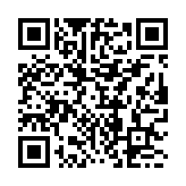
The payment address is shown as a QR code, plain text, and a one-click copy. Check it against support and this page before you send.
Service notes
General terms for this energy rental service. If anything changes, support’s latest confirmation applies.
FAQ
On the TRON network, calling a smart contract (for example, sending USDT) uses Energy and Bandwidth. If you do not have enough energy, the network burns TRX from your wallet as a fee. Renting energy is a way to reduce that burn.
Staking TRX can also give you energy, but it freezes those funds. If you only transfer occasionally, or you do not want to lock a large amount, renting as needed is usually more flexible. Compare the current quote to decide what makes sense for you.
Contact support on Telegram first, describe what you need, and confirm the quote. Then send the agreed amount of TRX to the official address on this page (TRON network only), and we will fulfill it as agreed. Do not skip the confirmation step and transfer on your own.
Please confirm the current quote with support before you pay. Do not send funds based only on the number shown here.
Use only the TRON network. Send only the TRX amount confirmed by support. Send only to the official address on this page. Before you pay, compare the QR code and the address character by character. Funds sent on the wrong network, as the wrong asset, or to the wrong address usually cannot be recovered.
Timing is confirmed with support. This page does not promise instant credit or a fixed number of minutes. Keep your transaction hash and send it to support after you pay.
No. The normal process is that you send TRX from a wallet you control. Anyone who asks for your seed phrase, private key, verification codes, or a “wallet authorization” is not following this service’s process.
Contact @avnm888 on Telegram. Please say what you need, how much energy you want, and the payment address you have checked, so we can confirm quickly.
Please confirm the amount and quantity with support first, then scan the QR code or copy the address to pay. Send TRX only on the TRON (TRC-20) network.
Copied to clipboard
Please check the address character by character. Transfers sent on the wrong network, in the wrong token, or to the wrong address usually cannot be recovered.
Contact support first @avnm888